On this page
What it verifies
A TCP port monitor connects to host and port at its interval from each of its regions, once per resolved address. It judges only whether the connection was accepted, refused, or timed out, and it records how long the connect took. It sends no payload and reads no banner.
Use it when
- A service listens on a port but has no HTTP endpoint, for example a database, a message queue, or an SSH, LDAP, or Redis port.
- Reachability of the port is the question, not the protocol behind it.
- A TLS port without HTTP should have its certificate watched without a second monitor.
It does not speak the protocol behind the port: no banner, no login, and no query. For a mail server, use the SMTP or IMAP check, and for an HTTP endpoint, use the HTTP(S) check. For a port that upgrades to TLS only after a plain dialog (STARTTLS), use the SMTP or IMAP check to watch its certificate.
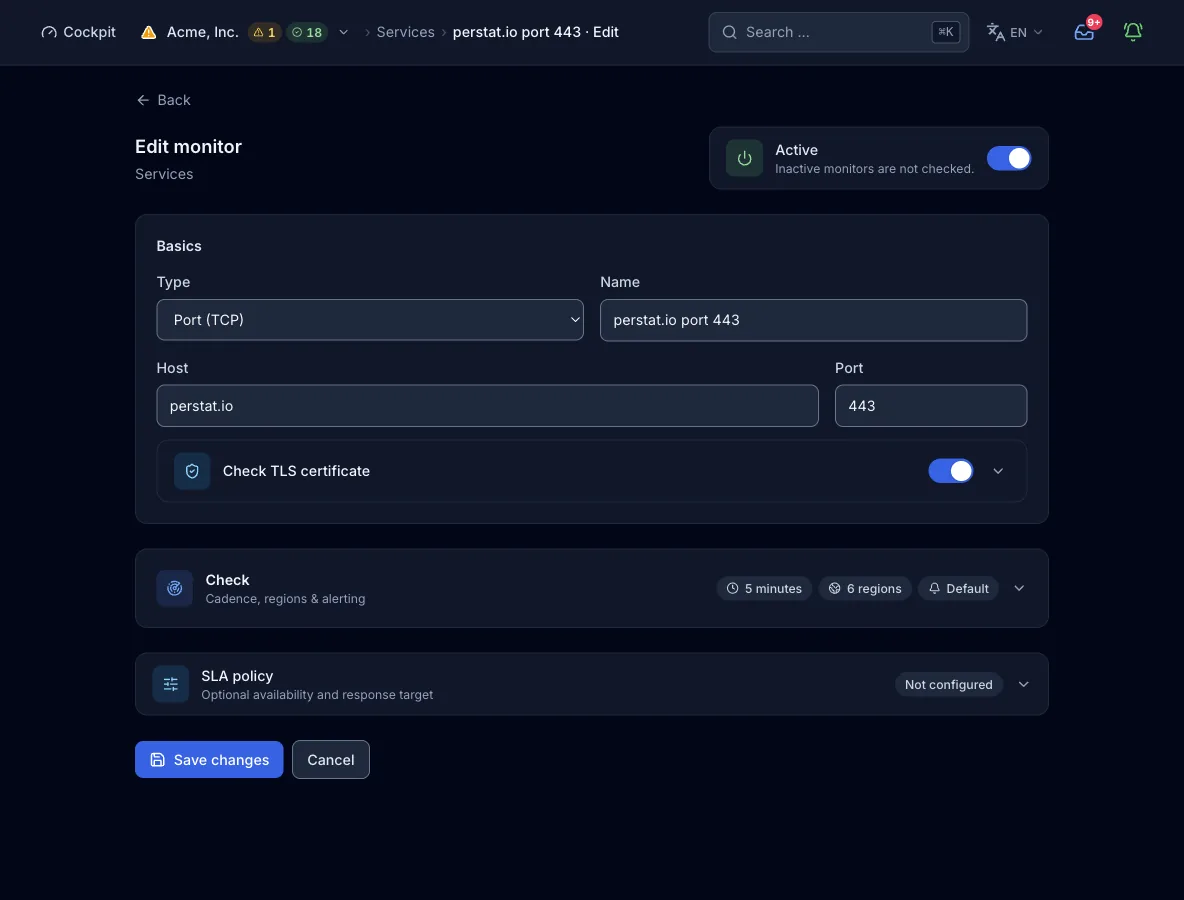
Configuration
Target. A host name or IP address without scheme, path, or spaces (labels up to 63 characters, 253 in total), plus a port from 1 to 65535. The probe resolves the host through its own resolver at check time.
| Field | Required | Values and default | Meaning |
|---|---|---|---|
hostHost | yes | Host name or IP address, no scheme, no path | The target. The probe connects to every resolved address of the selected family on its own, and each address gets its own sub-result. |
portPort | yes | 1 to 65535 | The port to connect to. It has no default, and a monitor saved without a port ends every check as an error, so always set it. The form sends the port only when you enter one. |
interval_secondsCheck interval | optional | Seconds, default 300, maximum 24 h, minimum set by the plan | How often each region runs the check. A value below the plan floor is raised to the floor, not rejected. Set it at the top level of the request, next to type and config, because the API ignores it inside config. |
regionsRegions | optional | Subset of na, eu, as, sa, af, oce. Omitted or empty: the first n keys in that order, n being the plan’s region limit | Which continents run the check. Set it at the top level of the request, next to type and config, because the API ignores it inside config. |
address_familiesIP families | optional | List of ipv4, ipv6, or both. Missing or empty means ["ipv4"] | With both families, family_fail_severity (degraded by default, or failed) sets the state when one family fails. The form offers ipv6 only when the host has an AAAA record or is an IPv6 literal. |
TLS certificate
With the switch on, a passing connect is followed by one direct TLS handshake per check, not per address, on the monitor’s port unless tls_cert.port names another one. The probe judges the certificate against your expiry, issuer, and subject rules. Without the switch, the check reads no certificate at all, and the monitor view shows none.
| Field | Required | Values and default | Meaning |
|---|---|---|---|
tls_cert.enabled | yes | true | Switches the sub-check on. |
tls_cert.port | optional | Port, default: the monitor’s port | The port for the TLS handshake, if it differs from the port being checked. |
tls_cert.warn_days | optional | Days, default 14 | Below this remaining lifetime, the check carries a certificate advisory, and owners and admins get an hourly email and in-app notice. The advisory never changes the state, but an expired certificate fails the check. |
tls_cert.issuer_regex | optional | Regular expression | The issuer must match, for example Let's Encrypt. |
tls_cert.subject_regex | optional | Regular expression | The subject common name must match. |
tls_cert.allow_self_signed | optional | false (default) or true | Skips the trust, hostname, and time checks in the handshake. Use it only for internal services with their own CA. Expiry and the regex assertions still apply, and the form asks you to confirm. |
How a check runs
- The probe reads the configuration. A missing port ends the check as an error before any network access.
- When a check is due, each region resolves the host through the node’s own resolver. It validates every address of the selected family against the blocked ranges.
- Every address gets one TCP connect with a 10 s timeout. The time to the accepted connection is the response time of that address.
- Only a passing check with the TLS certificate sub-check on runs the certificate policy. It runs once per check, as a direct TLS handshake on the monitor’s port or on
tls_cert.port. - The region sends its result to the control plane. Once the alert policy’s quorum of regions and consecutive checks agrees, an incident opens.
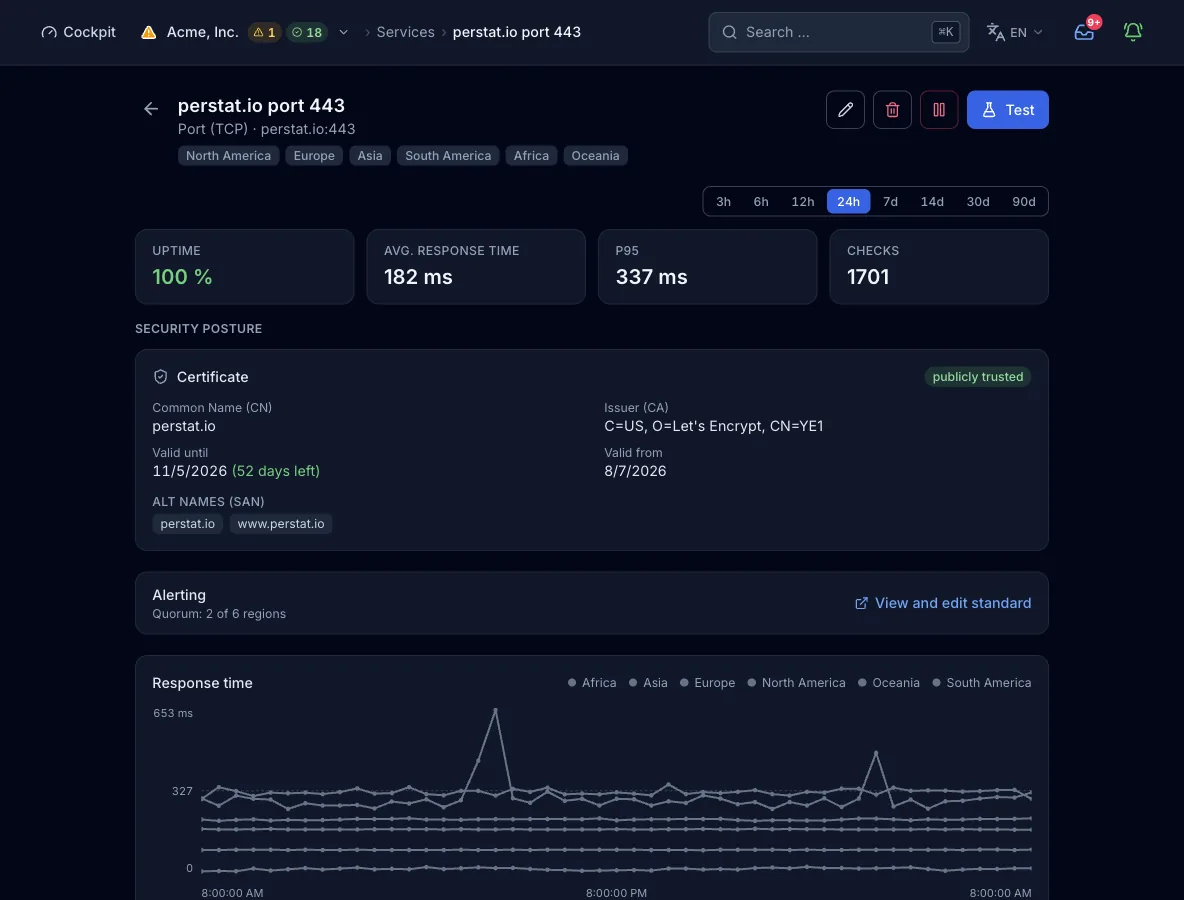
What a result contains
- Connection time
- Time from the connect call to the accepted connection, per region and per address (
latency_ms). - Detail line
- One line that says what happened: the port is open, the connection was refused with the reason, or the connect timed out.
- Certificate
- With the sub-check on: common name and alternative names, issuer, validity dates, and self-signed and trust status. Once the warning window is reached, the result also carries the expiry advisory.
- Region, family, address
- Every result carries the region that measured it, and one sub-result per IP family and per address.
States and severity
- okThe connection was accepted on every checked address. A certificate inside its warning window keeps this state.
- degradedOne IP family, or one of several resolved addresses, fails while the others answer, at the default
family_fail_severity. A single connect has no degraded outcome. - downThe connection is refused or times out, or the host does not resolve or resolves to a blocked address. With the sub-check on, a failing certificate policy counts too: expired, rejected handshake, or issuer or subject mismatch. With
family_fail_severity: failed, one failing family counts here as well. - errorThe configuration cannot run because the port is missing. It counts as an outage with severity critical.
Confirmed by quorum: by default, 2 regions must report the failure before an incident opens. The organization default asks for 2 regions and 2 consecutive checks. A monitor can carry its own rule with count or percent, consecutive checks, and a minimum duration.
Plans and limits
- Shortest interval
- 300 s on Free, 60 s on Pulse, 30 s on Sentinel, 15 s on Command, and 10 s on Enterprise. The web form offers 30 s, 1 min, 5 min, 15 min, and 1 h. The 15 s and 10 s floors are reachable only through MCP.
- Regions
- 2 of 6 on Free, 3 of 6 on Pulse, and all 6 from Sentinel. More regions than the plan allows are rejected, not trimmed.
- Monitors
- 10 on Free, 50 on Pulse, 150 on Sentinel, 500 on Command, and a custom quota on Enterprise. Eleven probe types share this quota, while host agents and heartbeats have their own.
From the pipeline or an agent
The same config works in the deploy step, in an MCP client such as Claude Code, and in the form above. create_monitor needs an organization-wide API key. If you omit regions, the plan picks its default.
{
  "name": "Postgres primary",
  "type": "tcp",
  "interval_seconds": 60,
  "config": {
    "host": "db.example.com",
    "port": 5432
  }
}
Every interface, with its boundary
Limits
- The check reads no banner, runs no protocol dialog, and sends no payload. It ends when the connection is accepted.
- Port 0 is rejected. A monitor saved without a port ends every check as an error.
- The TLS sub-check is a direct handshake on the monitor’s port unless
tls_cert.portnames another one. For a port that upgrades to TLS after a plain dialog (STARTTLS), use the SMTP or IMAP check. - The probe does not connect to targets that resolve to loopback, private, link-local, cloud metadata, or similar addresses. The check fails with the detail
internal or private, blocked. Saving such a monitor is not prevented. - Not every region probes IPv6, so selecting
ipv6restricts the usable regions.